First, open Google. Then click on the settings button pictured here. Then click on advanced search.

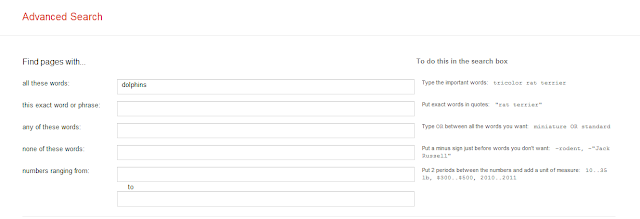
Use the first section to be more specific on the words that you want used or not used in the search:
Another option that is very helpful is the site or domain box pictured here:
Fill this box in with the type of URL ending that you are looking for. Information on .edu or .gov websites tends to be more reliable than on .com or .org websites. I have had more success using one ending at a time.

Another option is reading level. There are three levels that you can sort your searches by: basic, intermediate, and advanced.

Ever tried to find a power point online? File type is another option. This can limit your search to pdf files, word doc files, power point files, and others including swf or flash files used in multimedia.

The last item on advanced search is related to usage rights. These help you find images and websites that allow you to use them in presentations of your own.

Once you have completed it, just click on the advanced search button

